Home page of this blog

Showing posts with label i5 and i7. Show all posts

Monday, November 21, 2011

Custom 64 bit Ubuntu Kernel 3.1.1 optimized for i3, i5 and i7

Let me be terse

For building refer http://duopetalflower.blogspot.com/2011/10/custom-64-bit-ubuntu-kernel-31.html

Kernel 3.1.1 optimized with corei7 march, kernel frequency of 1000 HZ and processor selected as CORE2 (only built for 64 bit) with Ubuntu patches. The resulting deb binary are installable on ubuntu/mint systems

Kernel binary and buildscript zipped can be downloaded from the following mediafire link (
whose sha256sum is
38703cc653dde3bc3b0645393106ab4efff08ec362af0e0961c9dd8d2d09a8b1  Kernel3.1.1-i7.zip)

Buildscript can be downloaded from this mediafire link (whose sha256sum is 258c153288eb8a9a735e83a86e76cdfa7d2658eb75c6dc8b0a160bf4cc2f4fd9  buildscript-kernel3.1.1-i7.sh)

Some screenshots

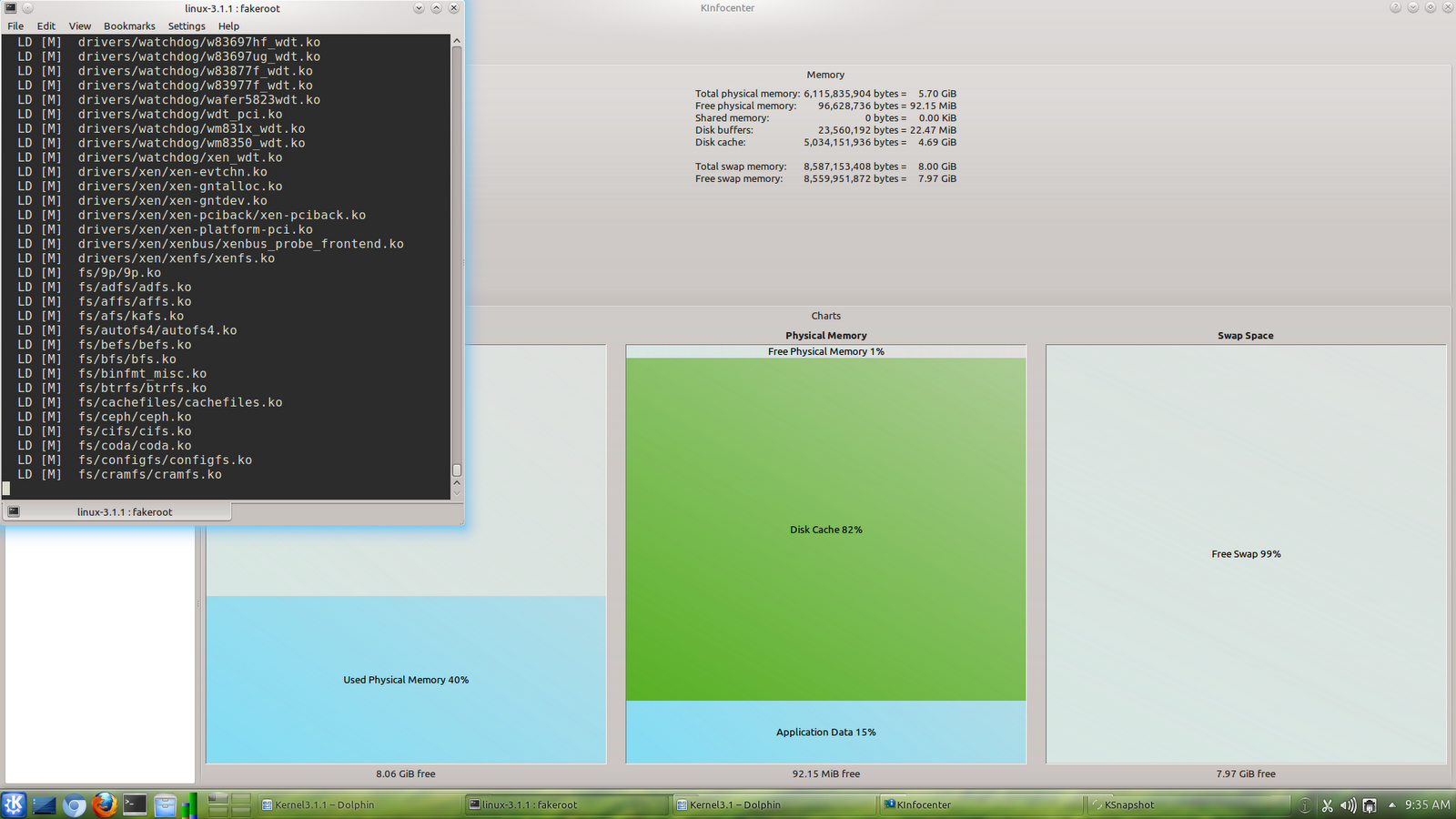
While building, can see how RAM is utilized efficiently by linux kernel


While installing the newly built kernel


After installation and rebooting into new kernel


Wednesday, October 26, 2011

Custom 64 bit Ubuntu Kernel 3.1 optimized for i3, i5 and i7


Kernel 3.1

I built the 64bit kernel 3.1 for my Kubuntu 11.10 desktop optimized for i7. Here is the screenshot of the kernel in action


Feel of the new kernel 3.1 seems to be very exciting. Kubuntu booted to login screen within 10 seconds. (With default kernel it took more than 20 seconds to boot Kubuntu 11.10 unlike ubuntu 11.10 which was faster to boot)

Here is how I built the kernel 3.1 Ubuntu way (in short 7 steps)

In brief
  1. Install build dependencies
  2. Download kernel source and ubuntu patches
  3. Extract and apply ubuntu patches
  4. Create a new flavour and tweak kernel config
  5. Modify Makefile for optimization
  6. Build
  7. Reboot and Enjoy

In detail

Install build dependencies

Open terminal/konsole and execute the following apt-get commands if you don't have essential build packages necessary for building kernel from source in Ubuntu


#Install Build essential to build kernel

sudo apt-get install fakeroot build-essential crash kexec-tools makedumpfile kernel-wedge libncurses5 binutils-dev libelf-dev libdw-dev libnewt-dev libncurses5-dev


sudo apt-get  --no-install-recommends install asciidoc xmlto

Download kernel source and ubuntu patches

Download the source of newly released linux kernel 3.1. The following wget -c makes it simple to download from commandline


#Download kernel source


wget -c http://www.kernel.org/pub/linux/kernel/v3.0/linux-3.1.tar.bz2


Here is how to download the 3.1 ubuntu patches

#Download ubuntu patches
wget -c http://kernel.ubuntu.com/~kernel-ppa/mainline/v3.1-oneiric/0001-base-packaging.patch
wget -c http://kernel.ubuntu.com/~kernel-ppa/mainline/v3.1-oneiric/0002-debian-changelog.patch
wget -c http://kernel.ubuntu.com/~kernel-ppa/mainline/v3.1-oneiric/0003-default-configs.patch


Extract and apply ubuntu patches

Extract downloaded kernel source and apply patches. Here I used tar to unzip the bzip tarball and patch to apply the patch


#Extract kernel source


tar xjvf linux-3.1.tar.bz2


#Create a soft link 

ln -s linux-3.1 linux


#Enter linux directory

cd linux

#Apply the patches

patch -p1 < ../0001-base-packaging.patch 
patch -p1 < ../0002-debian-changelog.patch 
patch -p1 < ../0003-default-configs.patch


Create a new flavour and tweak kernel config

Before creating a new flavor, give execute permissions to debian build scripts for building the kernel properly


#make debian/rules as executable

chmod -Rv +x debian/rules

#make debian/scripts directory executable

chmod -Rv +x debian/scripts/

To create a new flavour, just clone from generic flavor, here is how

#create i7 flavor
cp debian.master/config/amd64/config.flavour.generic debian.master/config/amd64/config.flavour.i7

Do the kernel configuration, I selected processor type as CORE2 and kernel frequency to 1000HZ (just give y only to the newly created flavor when executing editconfigs)


#clean
fakeroot debian/rules clean
fakeroot debian/rules updateconfigs
#give y only to i7 flavor, leave the rest untouched
fakeroot debian/rules editconfigs

Copy the abi related files from existing generic flavor and tweak to reflect the newly created flavor

#copy the abi entries for i7 flavor and add i7 entries in vars and amd64.mk
cp debian.master/abi/3.0.0-12.20/amd64/generic debian.master/abi/3.0.0-12.20/amd64/i7
cp debian.master/abi/3.0.0-12.20/amd64/generic.modules debian.master/abi/3.0.0-12.20/amd64/i7.modules
sed -i s/getall\ amd64\ generic\ server\ virtual/getall\ amd64\ generic\ server\ virtual\ i7/g debian.master/etc/getabis
sed -i s/\=\ generic\ server\ virtual/\=\ generic\ server\ virtual\ i7/g debian.master/rules.d/amd64.mk
cp debian.master/control.d/vars.generic debian.master/control.d/vars.i7
sed -i s/\"Generic\"/\"core\ i7\"/g debian.master/control.d/vars.i7


Modify Makefile for optimization

This is the place where we apply the optimizations. Ubuntu 11.10 comes with gcc 4.6 which has added new architectue corei7


#edit arch/x86/Makefile and arch/x86/Makefile_32.cpu if you want to tweak the march and mtune params of gcc

vi Makefile

vi arch/x86/Makefile

vi arch/x86/Makefile_32.cpu

In the main makefile, I changed HOSTCC and HOSTCXX to look as follows


HOSTCC       = gcc -march=corei7 -mtune=corei7 -pipe

HOSTCXX      = g++ -march=corei7 -mtune=corei7 -pipe


In other makefiles, replace lowercased core2 with corei7 (simple isn't it?)

Build

Do a clean build


#clean and build

fakeroot debian/rules clean


The following builds the common header and source debs

skipabi=true skipmodule=true fakeroot debian/rules binary-indep

The following builds the newly created flavor. Note I added no_dumpfile=yes as it was not building the dumpfile.

time skipabi=true skipmodule=true no_dumpfile=yes fakeroot debian/rules binary-i7

Wait for sometime (depends on speed of your processor). No need to tweak concurrency settings, which are taken care automatically. Install the newly built debs as follows after going one directory above

cd ..

sudo dpkg -i linux-headers-3.1.0-030100_3.1.0-030100.201110241006_all.deb linux-headers-3.1.0-030100-i7_3.1.0-030100.201110241006_amd64.deb linux-image-3.1.0-030100-i7_3.1.0-030100.201110241006_amd64.deb

Reboot and Enjoy

To test the newly built kernel, reboot and select the newly installed kernel from grub. If the newly installed kernel does not boot for some reason, do not panic, select the old ubuntu kernel and boot. (Grub2 does not wait beyond 3 seconds if there is no other OS present and very annoying, press escape within first 3 seconds to display the grub menu if it does not display) Follow this to know more about how to customize grub2 http://maketecheasier.com/mastering-grub-2-the-easy-way/2009/11/19

or

https://wiki.ubuntu.com/Grub2

sudo reboot

Download links

I have uploaded the kernel 3.1 debs which I built and use.  If you don't want to build yourself you can try these.

Here are the SHA256SUM checksum


8d1c58d614056b3cb2e05562d1108cd0a25aa7900ea02f602e8da7a6ead00c83  buildscript.sh

3cbd100b33734330f6b4da7a25cce5c0a45db9cee16bf609c554cbc9cd7b3f98  linux-headers-3.1.0-030100_3.1.0-030100.201110241006_all.deb

6ad9338017182590ef791ed12bbcaf0857090fb6028ec90b6d81ea04c38948f5  linux-headers-3.1.0-030100-i7_3.1.0-030100.201110241006_amd64.deb

e1d62da1add7bfc0b9976fac7d8be32512da8eb09c5b41a6ab66b8c43d12b52e  linux-image-3.1.0-030100-i7_3.1.0-030100.201110241006_amd64.deb

Here are the download links


Thursday, August 11, 2011

Custom kernel 3.0.1 ubuntu 64 bit kernel optimized for i3, i5 and i7 processors


For a nice pdf of document of the same click here
Download links are provided at the bottom of this article along with SHA256SUMS

Again thanks to Linux Mint 11, I am enjoying it
Introduction

I faced the following with earlier kernel builds

  1. Symlink errors while installing kernel debs in another system where the kernel build did not happen and lots of comments in the blog also reported the same
  2. DKMS modules did not work in different systems where the kernel build did not happen
  3. Cross compiling 32 bit kernels from my 64 bit PC was cumbersome

This kernel tries to address the above problems and give a kernel as similar to Ubuntu but with optimization. Towards the end of this document I have explained a step by step way of building the kernel Ubuntu way . Also I have made the same as a shell script which can be rerun again and again to build kernels Ubuntu way

This document is divided into two major sections, the first one is enough info about deb files and the second one is about how to build them

Info about the deb files

Requirements


This package is created in Linux Mint 11 and should install fine in all versions of Linux Mint 11 (as well Mint 10) and Ubuntu 11.04 (as well 10.10) (should as well in debian squeeze but not sure about dkms).

The build is done with march=core2 and mtune=native

This ensures the build will run on all core2 and above but will run with optimum speed on i3, i5 and i7 processors, so

The build is for 64bit i3,i5 and i7 processors

The following are the configuration settings


  1. Processor is selected as CORE2
  2. Makefile and Makefile_32.cpu modified to reflect march settings to core2 and mtune settings to native (my processor is i7 920)
  3. Configuration of oneiric kernel is taken as base, http://kernel.ubuntu.com/~kernel-ppa/mainline/v3.0.1-oneiric/
  4. Kernel Timer Frequency is 300 HZ

How to install


To install

sudo dpkg -i linux-headers-3.0.1-030001_3.0.1-030001.201108060905_all.deb linux-headers-3.0.1-030001-i7_3.0.1-030001.201108060905_amd64.deb linux-image-3.0.1-030001-i7_3.0.1-030001.201108060905_amd64.deb


After this reboot into the newly installed kernel from grub (use update-initramfs in case of 10.04 or older if it is not building initramfs)

Kernel Source


I downloaded the kernel source tarball from kernel.org

Version: 3.0.1


Ubuntu Oneiric Patches


How to build yourself


This kernel follows Ubuntu way of building kernel and has all ubuntu oneiric patches

The following is a documentation of building it the Ubuntu way, I used my article about Ubuntu Maverick kernel compilation as a base for this, with some modifications. Here is a step by step of the same (and this explains the shell script commands which I created for my own reference)

Install dependencies for building Kernel


Here are the apt-get commands to install the dependencies required for building kernel the Ubuntu way
sudo apt-get install fakeroot build-essential crash kexec-tools makedumpfile kernel-wedge libncurses5 binutils-dev libelf-dev libdw-dev libnewt-dev libncurses5-dev
sudo apt-get --no-install-recommends install asciidoc xmlto


Get the Kernel source and Ubuntu Patches


Create a directory for the building kernel source


#Enter into Home directory of the user
cd ~

#create a kernel directory if it is not there
mkdir -p kernel3.0.1

#enter into kernel directory
cd kernel3.0.1

The following wget commands is used to fetch the Kernel source and Ubuntu Patches


#get the kernel sources and ubuntu patches
#kernel 3.0.1

#Ubuntu Oneiric Patches from kernel ppa


Create a soft link of extracted kernel folder


#unpack linux kernel 3.0.1
tar xjf linux-3.0.1.tar.bz2


#create a soft link for the kernel directory
ln -s linux-3.0.1 linux


#enter into unpacked directory
cd linux


Install Ubuntu patches we downloaded earlier


#install the ubuntu/debian patches
patch -p1 < ../0001-base-packaging.patch
patch -p1 < ../0002-debian-changelog.patch
patch -p1 < ../0003-default-configs.patch


Create and configure a new kernel flavor, here I create it as i7


After the patches are applied, we come here to create a new flavor


Before this we need to give execute permissions to debian scripts and debian rules


Give execute permissions to debian/rules and debian/scripts


#make debian/rules as executable
chmod -Rv +x debian/rules
#make debian/scripts directory executable
chmod -Rv +x debian/scripts/


Copy existing generic flavor (or use existing flavor to create new flavor, here i7)


#create i7 flavor
cp debian.master/config/amd64/config.flavour.generic debian.master/config/amd64/config.flavour.i7


Configure the newly created flavor i7


#clean
fakeroot debian/rules clean
fakeroot debian/rules updateconfigs


When calling editconfigs, say n to avoid editing any other flavor except the created flavor, here i7. When a prompt asks us to edit i7 (or any other flavor you created) give y, this will open menuconfig of the kernel, feel free to change kernel configurations to hearts wish and dont forget to save while exiting the menuconfig screen. This is the place where I gave CORE2 as the processor type and changed kernel timer frequency to 300 HZ (or whichever you prefer)


#give y only to i7 flavor, leave the rest untouched
fakeroot debian/rules editconfigs


Edit debian related abi information for newly created flavor, here i7


#copy the abi entries for i7 flavor and add i7 entries in vars and amd64.mk
cp debian.master/abi/3.0.0-7.9/amd64/generic debian.master/abi/3.0.0-7.9/amd64/i7
cp debian.master/abi/3.0.0-7.9/amd64/generic.modules debian.master/abi/3.0.0-7.9/amd64/i7.modules
sed -i s/getall\ amd64\ generic\ server\ virtual/getall\ amd64\ generic\ server\ virtual\ i7/g debian.master/etc/getabis
sed -i s/\=\ generic\ server\ virtual/\=\ generic\ server\ virtual\ i7/g debian.master/rules.d/amd64.mk
cp debian.master/control.d/vars.generic debian.master/control.d/vars.i7
sed -i s/\"Generic\"/\"core\ i7\"/g debian.master/control.d/vars.i7


Edit architecture dependent Makefiles to finetune gcc flags for compilation


Architecture dependent Makefiles for kernel compilation will reside in arch//Makefile
For x86 architecture, the following are the two Makefiles
arch/x86/Makefile and arch/x86/Makefile_32.cpu


#edit arch/x86/Makefile and arch/x86/Makefile_32.cpu if you want to tweak the march and mtune params of gcc
vi arch/x86/Makefile
vi arch/x86/Makefile_32.cpu


After opening the Makefile search for CORE2 and change march=core2 and mtune=native


In Makefile the following will be the change


cflags-$(CONFIG_MCORE2) += \
                $(call cc-option,-march=core2,$(call cc-option,-mtune=native))


In Makefile_32.cpu the following will be the change

cflags-$(CONFIG_MCORE2) += -march=core2 $(call tune,native)


Build


Clean before building


#clean
fakeroot debian/rules clean


Build source and headers debian package which is independent of architecture or flavor, hence indep


#build headers/source deb files
skipabi=true skipmodule=true fakeroot debian/rules binary-indep


Set the CONCURRENCY_LEVEL for concurrent builds which will speed up the kernel compilation tremendously


#set the CONCURRENCY_LEVEL to the number of processor cores in system to do parallel compilation and thus speed up the kernel compilation
#`cat /proc/cpuinfo | grep "cpu cores" | head -1 | cut -d":" -f2 | cut -c2-` is used to get the number of cores
export CONCURRENCY_LEVEL=`cat /proc/cpuinfo | grep "cpu cores" | head -1 | cut -d":" -f2 | cut -c2-`


cat /proc/cpuinfo gives all info about cpu in the system
grepping for “cpu cores” gives multiple lines one fore each core
head -1 takes the first line of output
cut -d”:” -f2 uses : as delimiter and gives the second field, which is the number of cores
cut -c2- skips leading space


export makes this variable exported for the coming lines


To test the CONCURRENCY_LEVEL, use echo $CONCURRENCY_LEVEL


Build the flavor


It is nice to time a build, just prefix time command before any other command, here the kernel build command. While calling debian/rules, we are invoking the newly created flavor which is binary-i7 in this case


#build the actual kernel flavor i7 (and time it)
time skipabi=true skipmodule=true fakeroot debian/rules binary-i7


Wait for some time, have a coffee, relax and wait for your system to finish build. My system took 20 minutes to finish the build

Enjoy

Dropbox Download Links


http://dl.dropbox.com/u/22900905/MyKernelBuilds/3.0.1-030001-i7/BuildKernel3.0.1.sh
http://dl.dropbox.com/u/22900905/MyKernelBuilds/3.0.1-030001-i7/config-3.0.1-030001-i7
http://dl.dropbox.com/u/22900905/MyKernelBuilds/3.0.1-030001-i7/linux-headers-3.0.1-030001_3.0.1-030001.201108060905_all.deb
http://dl.dropbox.com/u/22900905/MyKernelBuilds/3.0.1-030001-i7/linux-headers-3.0.1-030001-i7_3.0.1-030001.201108060905_amd64.deb
http://dl.dropbox.com/u/22900905/MyKernelBuilds/3.0.1-030001-i7/linux-image-3.0.1-030001-i7_3.0.1-030001.201108060905_amd64.deb
http://dl.dropbox.com/u/22900905/MyKernelBuilds/3.0.1-030001-i7/Readme.odt
http://dl.dropbox.com/u/22900905/MyKernelBuilds/3.0.1-030001-i7/Readme.pdf
http://dl.dropbox.com/u/22900905/MyKernelBuilds/3.0.1-030001-i7/SHA256SUMS

SHA256SUMS


1291a52bbcbb74f6b044171ae10d4efe399cff2a615ac03ff8b4ff2c64983e53  BuildKernel3.0.1.sh
202e4bef97a05f1df4c93fb6821036018f1a4ccd25745eb16f21aca02c8e6be8  config-3.0.1-030001-i7
7ef4a2f7e22335498535e980bfed3afe58999922120ff2ae735970994d1d1318  linux-headers-3.0.1-030001_3.0.1-030001.201108060905_all.deb
05ba8bc60980868ac299a473c832768e4d185b3764e00b9012527578449afc71  linux-headers-3.0.1-030001-i7_3.0.1-030001.201108060905_amd64.deb
48bb53f0e50b6da024f40189bf859d686daad6801b76464829737a69ac93583e  linux-image-3.0.1-030001-i7_3.0.1-030001.201108060905_amd64.deb
f0cd271d2d4413a29b08963a9b9d99ef966513ecf815def2fed2c63a3638eb8b  Readme.odt
e56ef8600f25f99ea6707d87b3a48f793327111d6579031779acc54a8e61ea7c  Readme.pdf

Friday, June 10, 2011

Custom kernel 2.6.39.1 ubuntu amd64 packages optimized for i3, i5 and i7


This package is created in Ubuntu 11.04 and should install fine in all versions of Ubuntu Linux 11.04 (as well 10.10) and Linux Mint 11 (as well Mint 10) (should as well in debian squeeze but not sure about dkms)

The build is for 64bit i3,i5 and i7 processors and will work with only with i3, i5, or i7 processors

The following are the configuration settings

  1. Kernel Timer Frequency set to 1000 HZ
  2. Processor is selected as CORE2
  3. Makefile and Makefile_32 modified to reflect march settings and mtune settings to corei7 (new arch of gcc 4.6)
  4. Scheduled autogroup enabled
  5. Transparent hugepage support enabled
  6. Copied kernel source to /usr/src and built from /usr/src folder to avoid symlink issues with the built packages (actually when built from /home/sankaran, the built binary will have symlinks to /home/sankaran which is ludicrous)
  7. Used enterprise linux kernel config as the base config and the kernel mostly seems to have no kernel debug prints because of it. Hence it runs considerably faster than stock Ubuntu kernel (well we can feel it) (I extracted the srpm to recreate the el6 config, the el6 srpm can be downloaded from http://ftp.redhat.com/redhat/linux/enterprise/6Workstation/en/os/SRPMS/kernel-2.6.32-131.0.15.el6.src.rpm)
    Also I enabled transparent hugepages in the kernel config which I added in the newly created config(which was not there in the el6 config by default)

How to install

To install

sudo dpkg -i linux-image-2.6.39.1-corei7_14.00_amd64.deb linux-headers-2.6.39.1-corei7_14.00_amd64.deb

followed by (these steps update-initramfs and update-grub are not required for mint10 or maverick, these were required when using Ubuntu Lucid)

sudo update-initramfs -c -k 2.6.39.1-corei7

and final step of

sudo update-grub

before rebooting and reboot into the newly installed kernel from grub

How to build yourself

follow my blog on how to build kernel in ten steps at


Kernel Source

I downloaded the kernel source tarball from kernel.org

Version: 2.6.39.1

MD5SUMS


a49241f9031cde9edcf11944834f42ad  linux-headers-2.6.39.1-corei7_14.00_amd64.deb
7a737e291d424c7a150e77288d9bece5  linux-image-2.6.39.1-corei7_14.00_amd64.deb
843da30b6058a34d25457cc559b9fba5  Readme.odt
2fd411e9be96b2ecc69f0fbc3d590b99  Readme.pdf
ddb62c9453000f5dd617d97a37f1f353  CONFIG-EL6-UBUNTU

SHA256SUMS


7582e0b6b54d705ac2250daa1ca145d719dddf3e1834c11d37d949098ed7d808  linux-headers-2.6.39.1-corei7_14.00_amd64.deb
6c4ec5432fc850e1d5365a00c896a35d1e11cdd296e8dee373d6b4814a113bdb  linux-image-2.6.39.1-corei7_14.00_amd64.deb
3d8174e91f95503d2c3b6ffc89c91f96cffad715ffcd481227153acf57c9ad44  Readme.odt
1035eb068a70b2c1c32ba279535841a553341ad8910685cb4d4effe9ec302bcb  Readme.pdf
dceeb9d0f561266d7dba314e40054662834ec8056683e54a09accad9c4d0beaa  CONFIG-EL6-UBUNTU

My Personal Experience
With this kernel built with corei7 optimized I see Ubuntu booting in 7 to 9 seconds. corei7 is a new march added from gcc 4.6


I installed gcc 4.6 from ubuntu toolchain test ppa. If you want gcc 4.6 in Ubuntu 11.04 follow this

sudo apt-add-repository ppa:ubuntu-toolchain-r/test
sudo apt-get update


followed by upgrading gcc/g++/binutil packages from synaptic or update manager

With stock Ubuntu 11.04 it used to take 17 to 20 seconds. Also available RAM is more since I built with EL6 as base config.